
 EN
EN
Paper jam issues are among the most frustrating problems that printer users encounter, often occurring at the most inconvenient times. While there are various causes for paper jams, one of the most common culprits is a worn or damaged pickup roller. Understanding how to identify and replace a faulty pickup roller can save both time and money while ensuring your printer operates smoothly. This comprehensive guide will walk you through the process of diagnosing pickup roller issues and performing a successful replacement to eliminate recurring paper jams.
Understanding the Role of Pickup Rollers in Printer Operation
Primary Function of the Pickup Roller
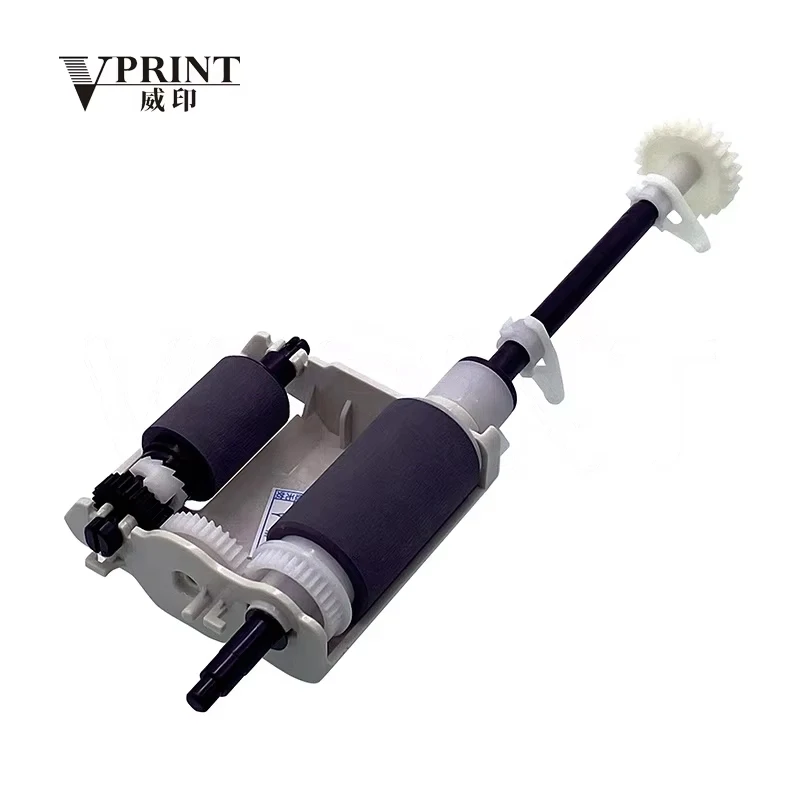
The pickup roller serves as a critical component in the paper feeding mechanism of laser printers and copiers. This rubber component is responsible for grabbing individual sheets of paper from the input tray and feeding them into the printer's paper path. When the pickup roller functions properly, it ensures smooth paper flow and prevents multiple sheets from being fed simultaneously. The rubber surface of the pickup roller provides the necessary grip to separate and advance paper through the printing process.
Over time, the pickup roller surface can become worn, hardened, or contaminated with paper dust and debris. This degradation directly impacts its ability to properly grip and feed paper, leading to frequent paper jams, misfeeds, or complete feeding failures. Understanding this fundamental role helps users recognize when pickup roller replacement becomes necessary for optimal printer performance.
Common Signs of Pickup Roller Deterioration
Several indicators suggest that your pickup roller may need replacement. The most obvious sign is recurring paper jams, particularly those occurring at the paper input stage. Users may notice that paper feeds inconsistently, with some sheets failing to advance while others feed multiple pages at once. Additionally, you might observe visible wear on the pickup roller surface, such as cracks, hardening, or a glossy appearance that indicates loss of grip.
Another telltale sign is when paper consistently skews or feeds at an angle, resulting in crooked prints or additional jams downstream in the paper path. If cleaning the pickup roller temporarily resolves feeding issues but problems quickly return, this typically indicates that the rubber has deteriorated beyond cleaning and requires replacement.
Diagnostic Steps Before Pickup Roller Replacement
Visual Inspection Techniques
Before proceeding with pickup roller replacement, conduct a thorough visual inspection to confirm the diagnosis. Power off the printer and carefully remove the paper tray to access the pickup roller area. Examine the pickup roller surface for obvious signs of wear, including cracks, hardening, or smooth areas where the rubber texture has worn away. A healthy pickup roller should have a slightly textured rubber surface that feels tacky to the touch.
Look for debris accumulation around the pickup roller, as paper dust, toner particles, and other contaminants can interfere with proper paper feeding. Check the surrounding areas for any obvious damage or misalignment that might contribute to paper jam issues. Document your observations to ensure you address all potential problems during the replacement process.
Testing Paper Feeding Performance
Perform controlled testing to isolate pickup roller issues from other potential causes. Load a small stack of fresh, high-quality paper into the tray and attempt to print several test pages. Monitor the feeding behavior carefully, noting whether papers feed individually or in multiples, and whether feeding occurs consistently or intermittently.
Try using different paper types and weights to determine if the pickup roller struggles with specific media. If the roller fails to grip lightweight papers but handles heavier stock adequately, this suggests moderate wear. Complete feeding failure across all paper types typically indicates severe pickup roller deterioration requiring immediate replacement.
Selecting the Correct Replacement Pickup Roller
Identifying Compatible Parts
Proper pickup roller selection is crucial for successful repair and long-term reliability. Always reference your printer's service manual or parts catalog to identify the correct pickup roller part number. Generic or incompatible rollers may appear similar but can have different dimensions, rubber compounds, or mounting configurations that affect performance and durability.
When sourcing replacement parts, consider both original equipment manufacturer options and high-quality aftermarket alternatives. Original parts typically offer guaranteed compatibility and performance but may come at a premium price. Quality aftermarket pickup roller assemblies can provide excellent value while meeting or exceeding original specifications.
Quality Considerations for Replacement Parts
When evaluating pickup roller options, prioritize parts that specify the rubber compound and durometer ratings. High-quality replacement rollers use specialized rubber formulations designed to maintain grip characteristics over extended use. Avoid extremely low-cost options that may use inferior materials prone to rapid deterioration or chemical breakdown.
Consider purchasing pickup roller kits that include related components such as separation pads, springs, and mounting hardware. These comprehensive kits ensure all wear items are replaced simultaneously, reducing the likelihood of future feeding problems and minimizing maintenance intervals. Quality suppliers often provide detailed installation instructions and compatibility information to support successful replacement.
Step-by-Step Pickup Roller Replacement Process
Preparation and Safety Procedures
Begin the pickup roller replacement process by ensuring the printer is completely powered off and unplugged from electrical sources. Allow adequate cooling time if the printer was recently in use, as internal components can retain significant heat. Gather necessary tools including screwdrivers, clean lint-free cloths, and isopropyl alcohol for cleaning purposes.
Create a clean workspace with adequate lighting to facilitate precise component handling. Remove all paper from input trays and clear the surrounding area of potential contaminants. Consider wearing anti-static gloves to prevent component damage and maintain cleanliness during the replacement process. Having your printer's service manual readily available will provide essential reference information throughout the procedure.
Accessing and Removing the Old Pickup Roller
Access procedures vary significantly between printer models, but most require removal of the paper tray and potentially additional covers or panels. Carefully disconnect any electrical connections to the pickup roller assembly, noting their positions for proper reassembly. Many pickup roller assemblies are secured with clips, screws, or twist-lock mechanisms that require gentle manipulation to avoid damage.
When removing the old pickup roller, pay attention to its orientation and mounting configuration. Some rollers are part of larger assemblies that include gears, springs, or electronic sensors. Take photographs during disassembly to document proper component placement and orientation. Clean the mounting area thoroughly before installing the new pickup roller to ensure optimal fit and performance.
Installation and Testing of the New Pickup Roller
Proper Installation Techniques
Install the new pickup roller by reversing the removal process, ensuring proper alignment and secure mounting. Verify that all mounting clips, screws, or locking mechanisms are properly engaged to prevent component movement during operation. Reconnect any electrical connections, ensuring firm contact and proper routing to avoid interference with moving parts.
Before reassembling covers and panels, manually rotate the pickup roller to verify smooth operation and proper clearances. The roller should move freely without binding or excessive play. Check that associated components such as separation pads and paper guides are properly positioned and secure. This attention to detail during installation prevents future problems and ensures optimal pickup roller performance.
Post-Installation Testing and Calibration
After completing the pickup roller installation, conduct comprehensive testing to verify proper operation. Begin with a few test prints using standard office paper to confirm basic feeding functionality. Gradually test with different paper types and sizes to ensure the new pickup roller handles various media correctly without jamming or misfeeding.
Monitor the first several dozen prints carefully for any signs of feeding inconsistencies or quality issues. Some printers may require calibration procedures after pickup roller replacement to optimize timing and pressure settings. Consult your service manual for any specific calibration requirements and perform these procedures as directed to achieve optimal performance.
Maintenance Tips to Extend Pickup Roller Life
Regular Cleaning Procedures
Implementing regular pickup roller maintenance significantly extends component life and reduces replacement frequency. Monthly cleaning with isopropyl alcohol and a lint-free cloth removes accumulated paper dust, toner particles, and other contaminants that degrade rubber grip. Ensure the printer is powered off during cleaning and allow complete drying before resuming operation.
Avoid using harsh chemicals or abrasive materials that can damage the pickup roller surface. Water-based cleaners should be avoided as they can cause rubber swelling or degradation. Some manufacturers provide specific cleaning solutions designed for pickup roller maintenance that offer superior results while preserving rubber integrity.
Environmental Considerations
Environmental factors significantly impact pickup roller longevity and performance. Maintain stable temperature and humidity levels in the printer's operating environment, as extreme conditions accelerate rubber degradation. High humidity can cause paper to curl or stick together, increasing pickup roller stress, while low humidity creates static electricity that interferes with proper paper separation.
Store paper in appropriate conditions and use fresh, high-quality media to reduce pickup roller wear. Poor-quality or aged paper often contains excessive dust or has degraded surface characteristics that accelerate pickup roller deterioration. Establishing proper paper handling and storage procedures contributes significantly to overall printer reliability and pickup roller lifespan.
FAQ
How often should I replace my printer's pickup roller?
Pickup roller replacement frequency depends on usage volume, paper quality, and environmental conditions. In typical office environments, pickup rollers should be replaced every 50,000 to 100,000 pages or when paper feeding problems occur. High-volume users may need more frequent replacement, while light-duty applications can extend intervals. Monitor feeding performance rather than relying solely on page counts to determine replacement timing.
Can I clean a worn pickup roller instead of replacing it?
While cleaning can temporarily improve pickup roller performance, it cannot restore worn or hardened rubber surfaces. Cleaning is most effective for removing contaminants from otherwise healthy rollers. If cleaning provides only brief improvement before problems return, replacement is necessary. Severely worn pickup rollers with smooth or cracked surfaces require replacement regardless of cleaning efforts.
What causes pickup rollers to wear out prematurely?
Several factors contribute to premature pickup roller wear, including poor paper quality, excessive dust exposure, temperature extremes, and contamination from toner or other substances. Using appropriate paper types, maintaining clean environments, and regular cleaning help maximize pickup roller life. Aggressive paper handling or forcing jammed paper through the mechanism can also accelerate wear and require earlier replacement.
Are aftermarket pickup rollers as reliable as original parts?
High-quality aftermarket pickup rollers can match or exceed original part performance when manufactured to proper specifications. However, quality varies significantly among suppliers, making careful selection crucial. Look for parts from reputable manufacturers with positive reviews and specifications matching original components. Extremely low-priced options often use inferior materials that provide poor longevity and performance compared to quality aftermarket or original parts.
Table of Contents
- Understanding the Role of Pickup Rollers in Printer Operation
- Diagnostic Steps Before Pickup Roller Replacement
- Selecting the Correct Replacement Pickup Roller
- Step-by-Step Pickup Roller Replacement Process
- Installation and Testing of the New Pickup Roller
- Maintenance Tips to Extend Pickup Roller Life
- FAQ