
 EN
EN

When purchasing copier spare parts, a small difference in a model number can sometimes make a big difference.
Recently, we received a customer complaint regarding a Kyocera TASKalfa 5500i control panel. The customer sent us comparison photos and explained that the control panel we supplied was different from the one installed on their machine.
At first, it appeared that the wrong part might have been shipped.
However, after checking the machine information carefully, we found the actual reason: the customer's machine was a Kyocera TASKalfa 5501i, while the control panel ordered was for the TASKalfa 5500i.
The customer had assumed that the two models used the same control panel because their model numbers were almost identical.
This is an understandable mistake—and it is actually quite common when purchasing copier spare parts.
The important point is that similar model numbers do not automatically mean identical parts.
In this article, we will use the Kyocera TASKalfa 3500i, 4500i, 5500i, 3501i, 4501i and 5501i as an example to explain how to identify Kyocera models and, more importantly, how to avoid ordering the wrong spare parts.
Kyocera 5500i vs. 5501i: What's the Difference?
At first glance, these two model numbers look almost identical:
- Kyocera TASKalfa 5500i
- Kyocera TASKalfa 5501i
Only the final digit is different.
This makes it very easy for a buyer to assume that they are simply different versions of the same machine and that their spare parts can be used interchangeably.
However, when purchasing spare parts, you should never determine compatibility based only on how similar the model numbers look.
For certain parts, the 3500i/4500i/5500i models are grouped together, while the 3501i/4501i/5501i models form another closely related group.
A useful way to remember this is:
| Kyocera Model Group | Parts Identification |
|---|---|
| TASKalfa 3500i / 4500i / 5500i | Treat as one model group when checking parts |
| TASKalfa 3501i / 4501i / 5501i | Treat as another model group when checking parts |
| 5500i vs. 5501i | Do not assume the same part is compatible |
However, this does not mean that every part is different between the two groups.
Some consumables or mechanical components may be shared across multiple models. For example, some commercially listed Kyocera parts are specified for all six models.
Therefore, the correct principle is:
Model similarity is not enough. Always verify the compatibility of the specific part.
This distinction is especially important for electronic assemblies and other model-sensitive components.
Why Similar Kyocera Model Numbers Can Be Misleading
Kyocera uses structured model numbers to distinguish different machines and configurations.
From a buyer's perspective, the difference between 5500i and 5501i may look very small.
From a parts perspective, however, that difference can be important.
The same principle applies when comparing:
- 3500i and 3501i
- 4500i and 4501i
- 5500i and 5501i
Instead of asking:
"The models look almost the same. Can I use the same part?"
a professional parts buyer should ask:
"Is this specific part confirmed for my exact machine model?"
That is a much safer way to purchase copier spare parts.
Control Panels Are a Good Example
Control panels are a particularly good example of why model identification matters.
A control panel is not simply a plastic housing with buttons.
Inside the assembly, there can be:
- Main control PCB
- Interface boards
- Ribbon cables
- Connectors
- Control circuits
- Display-related components
- Mounting structures
- Wiring assemblies
Two control panels may look similar from the outside but have different internal configurations.
The difference is not always visible from the outside.
The following photos show the internal structure of two Kyocera control panel assemblies.
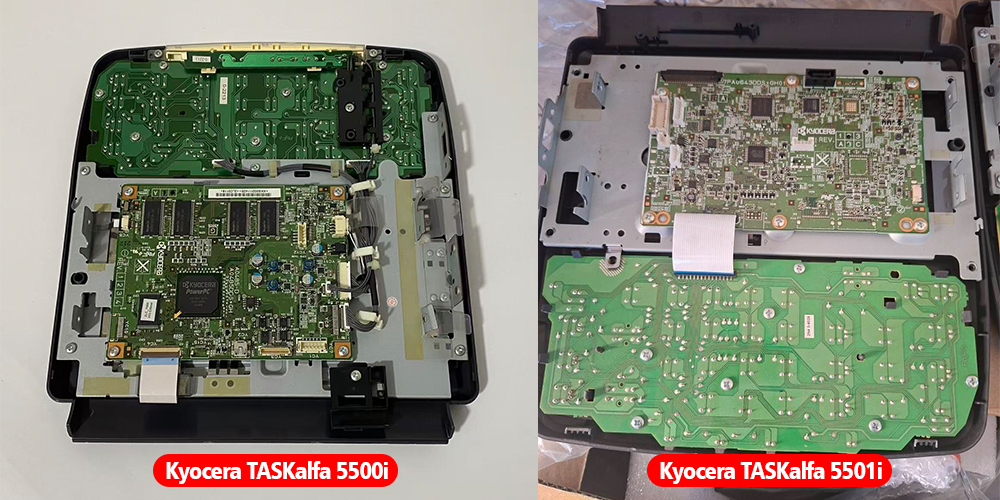
In the actual comparison photos, the PCB layout, connectors, wiring and internal structure can be different.
This is why visual similarity alone should not be used as the final standard for parts compatibility.
For control panels and other electronic parts, it is particularly important to check the exact machine model and OEM part number before ordering.
Why OEM Part Numbers Are So Important
One of the most reliable ways to identify a copier spare part is the OEM part number.
For example, if a customer tells us:
"I need a control panel for a Kyocera 5500 series machine."
that information may not be enough.
A much better inquiry would include:
Machine model: Kyocera TASKalfa 5501i
Original part number: XXXXXXXX
With the complete model and original part number, it becomes much easier to determine whether the requested replacement is correct.
This is particularly important for:
- Control panels
- Main boards
- PCBs
- Power supply boards
- Engine boards
- Fuser assemblies
- Developer units
- Imaging units
- Paper feed assemblies
- Other electronic or model-specific assemblies
Don't Choose a Kyocera Part Based on Appearance Alone
A common mistake among spare-parts buyers is comparing only the physical appearance.
For example:
"The connector looks the same."
or:
"The housing is exactly the same."
or:
"The model number is only different by one digit."
None of these observations alone can guarantee compatibility.
A professional compatibility check should consider several factors together:
1. Complete Machine Model
Always provide the complete model number.
For example:
TASKalfa 5500i
is more useful than simply saying:
TASKalfa 5500 series
2. OEM Part Number
If the original part has an OEM number, provide it whenever possible.
3. Physical Structure
Compare:
- PCB
- Connectors
- Ribbon cables
- Mounting holes
- Housing
- Switches/buttons
- Wiring
4. Confirmed Compatibility
The most important question is:
Has this specific part been confirmed for my exact machine model?
A Real Example: How a Small Model Difference Can Cause a Big Problem
Let's return to our recent customer case.
The customer needed a control panel and believed that the Kyocera 5500i and 5501i used the same panel.
The order was therefore placed for the 5500i version.
After receiving the product, the customer compared it with the original panel on their machine and found differences.
The customer contacted us because they believed that the wrong product had been shipped.
After checking the machine information, we discovered:
Ordered model: TASKalfa 5500i
Customer's machine: TASKalfa 5501i
The issue was therefore not a shipping mistake.
It was a model identification mistake.
This is exactly the type of problem that can be avoided by checking the complete machine model before ordering.
A Simple Kyocera Parts Buying Checklist
Before ordering a Kyocera spare part, we recommend checking the following:
☑ Complete machine model
☑ OEM part number
☑ Part description
☑ Physical appearance and structure
☑ Connector and mounting configuration
☑ Confirmed compatibility
If you are buying several pieces—or placing a wholesale order—it is even more important to verify compatibility before shipment.
A small mistake in model identification can result in:
- Incorrect parts
- Additional shipping costs
- Returns
- Installation delays
- Machine downtime
- Extra communication between buyer and supplier
Spending a few minutes on compatibility verification can prevent much larger problems later.
How Vprintech Helps Customers Check Kyocera Parts
At Vprintech, we have been working with printer and copier parts and consumables for many years.
We understand that identifying a copier part is not simply a matter of matching a product name.
For Kyocera parts, we recommend checking the complete machine model, OEM part number and actual part configuration before confirming an order whenever there is any uncertainty.
If a customer is unsure about a part, providing a photo of the original component can also be helpful.
Our team can compare:
- Machine model
- OEM part number
- Part photos
- PCB and connector configuration
- Known model compatibility
before the order is finalized.
For professional buyers, this additional step can help reduce the risk of ordering an incorrect part.
Final Thoughts
The Kyocera 5500i and 5501i case is a good reminder that a small difference in a model number should never be ignored when purchasing copier spare parts.
The 3500i / 4500i / 5500i and 3501i / 4501i / 5501i models are closely related, and some parts may be shared across these machines. However, other components—particularly certain electronic assemblies—may require model-specific verification.
Therefore, the safest approach is not to assume compatibility based on appearance or a similar model number.
Instead:
Check the complete machine model.
Check the OEM part number.
Confirm compatibility before ordering.
If you are not sure which Kyocera part you need, send us the complete machine model, OEM part number, or photos of the original part.
We will be happy to help you check the compatibility before you place your order.