
 EN
EN
Brother printers are renowned for their reliability and consistent performance in office and home environments. However, like all sophisticated printing equipment, they can occasionally experience technical issues that disrupt normal operation. Among the most common problems users encounter are Brother fuser errors, which can significantly impact print quality and overall printer functionality. Understanding these errors and knowing how to address them effectively is crucial for maintaining optimal printer performance and minimizing costly downtime.
The fuser unit plays a vital role in the laser printing process by applying heat and pressure to permanently bond toner particles to paper. When Brother fuser errors occur, they typically manifest as poor print quality, incomplete text or images, or complete printing failures. These issues can stem from various causes, ranging from worn-out components to improper maintenance procedures. Recognizing the symptoms early and implementing appropriate troubleshooting measures can save both time and money while extending the life of your Brother printer.
Modern Brother laser printers incorporate sophisticated diagnostic systems that monitor fuser unit performance continuously. When these systems detect anomalies or potential failures, they generate specific error codes to help users and technicians identify the root cause of the problem. By understanding what these error messages mean and following systematic troubleshooting procedures, users can often resolve Brother fuser errors without requiring professional service intervention or expensive component replacements.
Understanding Brother Fuser Unit Components
Primary Fuser Assembly Structure
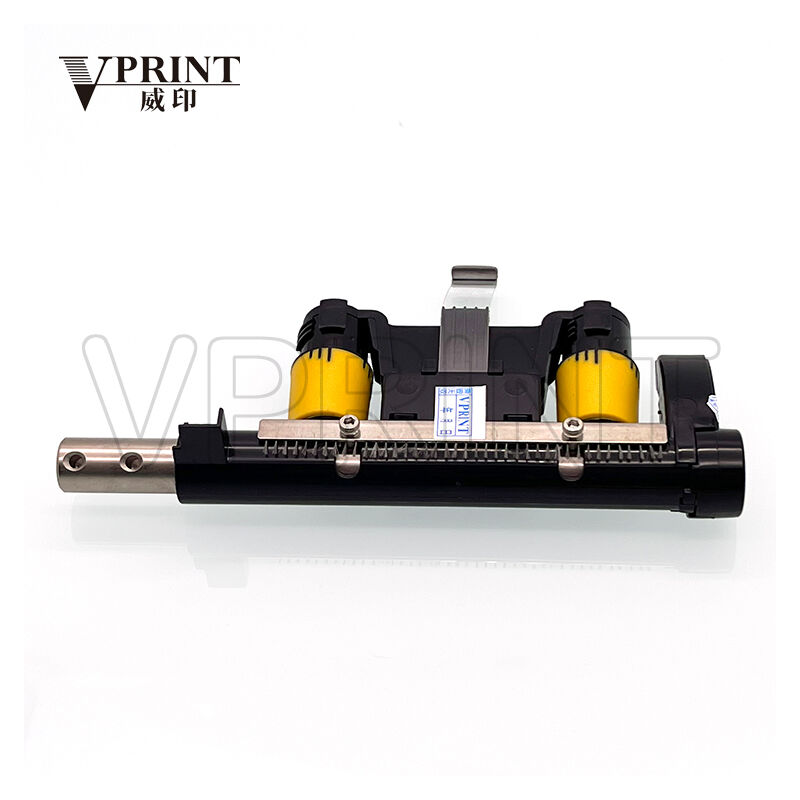
The Brother fuser assembly consists of several critical components that work together to complete the printing process. The heating roller, typically made of aluminum with a Teflon coating, generates the necessary temperature to melt toner particles onto paper. This roller is heated by internal halogen lamps or ceramic heating elements, depending on the printer model. The pressure roller, positioned opposite the heating roller, applies consistent pressure to ensure proper toner adhesion and smooth paper transport through the fuser unit.
Temperature sensors throughout the fuser assembly monitor heat levels continuously to prevent overheating and ensure optimal printing conditions. These sensors communicate with the printer's control system to maintain precise temperature control and trigger Brother fuser errors when readings fall outside acceptable parameters. The thermistor, a key temperature-sensing component, provides real-time feedback to the printer's microprocessor, enabling automatic adjustments to maintain consistent fusing temperatures across different paper types and printing conditions.
Separation mechanisms within the fuser unit prevent paper from wrapping around the heating roller, a condition that could cause severe damage to both the paper path and fuser components. These mechanisms include separation claws or fingers that guide paper smoothly through the fusing process. When these components become worn or misaligned, they can contribute to paper jams and subsequent Brother fuser errors that may require professional attention to resolve completely.
Fuser Unit Operation Principles
The fusing process begins when the printer's control system activates the heating elements to reach the predetermined temperature for the selected paper type and print settings. This warm-up period is essential for preventing Brother fuser errors related to insufficient heat application. During normal operation, the fuser unit maintains temperatures between 160°C and 200°C, depending on paper thickness and toner formulation requirements.
As paper passes through the fuser assembly, the combination of heat and pressure permanently bonds toner particles to the paper surface. The precise timing and coordination of these elements determine print quality and durability. Any disruption in this process, whether from temperature fluctuations, pressure variations, or mechanical failures, can result in Brother fuser errors that affect print output quality and potentially damage the printer's internal mechanisms.
Advanced Brother printers incorporate intelligent fuser control systems that adjust operating parameters based on environmental conditions, paper characteristics, and printing volume. These systems help prevent common Brother fuser errors by automatically compensating for variations in humidity, ambient temperature, and paper moisture content. Understanding these operational principles helps users appreciate why proper maintenance and environmental control are crucial for preventing fuser-related problems.
Common Brother Fuser Error Codes and Symptoms
Temperature-Related Error Messages
Brother printers display specific error codes when temperature-related issues occur within the fuser unit. Error code 50 typically indicates that the fuser unit has exceeded its maximum operating temperature, triggering an automatic shutdown to prevent component damage. This overheating condition can result from blocked ventilation, accumulated toner dust, or failing temperature sensors. Users experiencing this error should immediately power off the printer and allow it to cool completely before attempting any troubleshooting procedures.
Conversely, error codes indicating insufficient fuser temperature suggest that the heating elements are not reaching proper operating levels. These Brother fuser errors can stem from faulty heating lamps, defective thermistors, or power supply irregularities. Symptoms accompanying temperature-related errors often include poor toner adhesion, smudged prints, or completely blank pages. Addressing these issues promptly prevents additional damage and maintains consistent print quality.
Environmental factors significantly influence temperature-related Brother fuser errors, particularly in extreme climates or poorly ventilated spaces. High ambient temperatures can cause premature overheating, while cold environments may prevent proper warm-up cycles. Understanding these relationships helps users implement preventive measures and create optimal operating conditions for their Brother printers.
Mechanical Failure Indicators
Mechanical Brother fuser errors often present as grinding noises, irregular paper feeding, or visible damage to printed output. These symptoms typically indicate worn rollers, damaged gears, or misaligned components within the fuser assembly. Error codes related to mechanical failures may reference specific component malfunctions, helping users identify which parts require attention or replacement.
Paper jams occurring consistently in the fuser area suggest mechanical issues that require immediate attention. These jams can result from worn separation mechanisms, damaged pressure rollers, or accumulated debris interfering with normal paper transport. Ignoring these warning signs often leads to more severe Brother fuser errors and potentially expensive repairs. Regular inspection of the paper path and fuser area helps identify early signs of mechanical wear before they escalate into major problems.
Unusual print patterns, such as regular marks or streaks appearing at consistent intervals, often indicate specific mechanical issues within the fuser unit. These patterns correspond to the circumference of particular rollers or gears, helping technicians pinpoint the source of Brother fuser errors. Documenting these patterns and their frequency provides valuable diagnostic information for troubleshooting and repair procedures.
Step-by-Step Troubleshooting Procedures
Initial Diagnostic Steps
When encountering Brother fuser errors, begin troubleshooting by recording the exact error code and any accompanying symptoms. This information proves invaluable for identifying appropriate solutions and tracking recurring issues. Power off the printer completely and disconnect it from the electrical supply to ensure safety during inspection procedures. Allow sufficient cooling time, especially if overheating errors have occurred, as fuser components can remain dangerously hot for extended periods after shutdown.
Examine the printer's display panel for any additional status messages or warnings that might provide clues about the underlying cause of Brother fuser errors. Check the printer's event log if available, as this feature often contains detailed information about recent errors and their timestamps. This data helps identify patterns or recurring issues that might indicate systematic problems requiring professional attention.
Inspect the printer's external condition, paying particular attention to ventilation openings and air intake areas. Blocked vents can contribute to overheating and subsequent Brother fuser errors by preventing adequate cooling airflow. Remove any dust, debris, or paper particles that might interfere with proper ventilation. Ensure the printer is positioned according to manufacturer specifications, with adequate clearance around all sides for proper air circulation.
Component Inspection and Cleaning
Access the fuser unit according to your Brother printer model's service manual, taking care to follow all safety precautions. Remove the fuser assembly if possible, handling it carefully to avoid damaging delicate components. Visually inspect all accessible parts for signs of wear, damage, or excessive toner accumulation. Look for cracked rollers, damaged gears, or bent separation mechanisms that might contribute to Brother fuser errors.
Clean the fuser unit using appropriate methods and materials recommended by Brother for your specific printer model. Use lint-free cloths and approved cleaning solutions to remove toner residue and paper dust from accessible surfaces. Pay particular attention to temperature sensors and electrical contacts, as contamination in these areas can cause erratic behavior and false Brother fuser errors. Avoid using excessive moisture or harsh chemicals that might damage sensitive components.
Examine the paper path for any obstructions or accumulated debris that might interfere with normal paper transport through the fuser area. Remove any torn paper fragments, foreign objects, or excessive toner buildup that could cause jams or mechanical stress. Check that all separation mechanisms move freely and are properly aligned according to manufacturer specifications. Lubricate moving parts only if specifically recommended by Brother, using approved lubricants in prescribed quantities.
Preventive Maintenance Strategies
Regular Cleaning Schedules
Implementing a systematic cleaning schedule significantly reduces the likelihood of Brother fuser errors and extends the operational life of your printer. Establish weekly cleaning routines that include removing dust and debris from external surfaces, ventilation openings, and accessible internal areas. Monthly deep cleaning procedures should address the fuser area specifically, focusing on toner accumulation and paper dust removal that can interfere with proper operation.
Document all maintenance activities in a service log, including dates, procedures performed, and any observations about component condition. This record helps identify wear patterns and predict when Brother fuser errors might occur due to normal component aging. Regular maintenance documentation also proves valuable when seeking warranty service or professional repair assistance, demonstrating proper care and maintenance practices.
Train all users on basic maintenance procedures and warning signs that indicate potential Brother fuser errors. Educated users can identify problems early and perform routine maintenance tasks that prevent minor issues from escalating into major failures. Provide clear instructions on safe cleaning procedures and emphasize the importance of allowing adequate cooling time before accessing any internal components.
Environmental Control Measures
Maintaining optimal environmental conditions plays a crucial role in preventing Brother fuser errors and ensuring consistent printer performance. Control ambient temperature within the range specified in your printer's documentation, typically between 10°C and 32°C for most Brother laser printers. Extreme temperatures can stress fuser components and contribute to premature failure or erratic operation that manifests as error conditions.
Monitor humidity levels carefully, as both excessive moisture and extremely dry conditions can affect fuser operation and contribute to Brother fuser errors. Ideal relative humidity ranges between 20% and 80%, with 50% being optimal for most printing applications. High humidity can cause paper moisture problems that affect fusing quality, while low humidity increases static electricity buildup that can interfere with proper toner transfer and fusing processes.
Ensure adequate ventilation around the printer installation area to promote proper heat dissipation and prevent the accumulation of toner particles in the air. Good ventilation also helps maintain stable operating conditions and reduces the likelihood of overheating-related Brother fuser errors. Consider using air filtration systems in dusty environments to minimize contamination of sensitive printer components.
Professional Service and Replacement Options
When to Seek Professional Help
Certain Brother fuser errors require professional diagnostic equipment and specialized knowledge to resolve safely and effectively. Recurring temperature errors, despite proper maintenance and environmental controls, often indicate component failures that require expert assessment and replacement. Electrical issues within the fuser unit, such as faulty heating elements or defective temperature sensors, typically exceed the capabilities of standard user maintenance and troubleshooting procedures.
Complex mechanical problems, including gear failures, roller bearing issues, or structural damage to the fuser assembly, generally require professional service intervention. Attempting repairs beyond basic maintenance procedures can void warranties and potentially cause additional damage that increases repair costs. Professional technicians have access to genuine Brother replacement parts and specialized tools necessary for proper fuser unit servicing and calibration.
Persistent Brother fuser errors that continue despite following all recommended troubleshooting procedures suggest underlying issues that require professional diagnosis. Service technicians can perform comprehensive system tests, access advanced diagnostic features, and identify intermittent problems that might not be apparent during basic troubleshooting. Early professional intervention often proves more cost-effective than allowing problems to escalate into major component failures.
Replacement Part Selection and Installation
When Brother fuser errors necessitate component replacement, selecting appropriate parts ensures optimal performance and longevity. Genuine Brother replacement parts maintain original equipment specifications and compatibility, reducing the likelihood of future problems. While aftermarket alternatives might offer cost savings, they may not provide the same reliability or performance standards as original components, potentially leading to recurring Brother fuser errors.
Complete fuser unit replacement becomes necessary when multiple components show signs of wear or when repair costs approach the price of new assemblies. Modern Brother fuser units incorporate numerous integrated components that work together as complete systems. Replacing individual components within aged fuser assemblies may provide only temporary solutions, with other components likely to fail shortly after initial repairs.
Professional installation ensures proper calibration and alignment of replacement fuser components, minimizing the risk of future Brother fuser errors. Proper installation procedures include temperature calibration, pressure adjustments, and system initialization that require specialized knowledge and equipment. DIY installation attempts may result in improper operation, reduced print quality, or premature component failure that negates potential cost savings from self-service repairs.
FAQ
What causes most Brother fuser errors in laser printers?
Most Brother fuser errors result from temperature-related issues, including overheating due to blocked ventilation, worn heating elements, or faulty temperature sensors. Mechanical wear of rollers and separation mechanisms also contributes significantly to fuser problems. Poor maintenance practices, such as infrequent cleaning and using incorrect paper types, can accelerate component wear and increase error frequency. Environmental factors like extreme temperatures and high humidity levels also play important roles in fuser unit reliability and performance.
How often should I perform preventive maintenance to avoid fuser errors?
Implement weekly external cleaning and monthly internal maintenance procedures to minimize Brother fuser errors. High-volume printing environments may require more frequent attention, possibly bi-weekly internal cleaning depending on usage patterns. Replace consumable components according to manufacturer recommendations rather than waiting for error messages. Environmental conditions and paper quality affect maintenance frequency requirements, with dusty or humid conditions necessitating more frequent cleaning intervals to maintain optimal fuser performance.
Can I continue printing when Brother fuser errors occur?
Never continue printing when Brother fuser errors are displayed, as this can cause permanent damage to the fuser unit and other printer components. Temperature-related errors particularly require immediate printer shutdown to prevent overheating damage. Attempting to bypass error messages or continue operation can result in poor print quality, paper jams, and potentially dangerous conditions. Always address the underlying cause of Brother fuser errors before resuming normal printing operations to ensure safety and prevent costly repairs.
Are aftermarket replacement parts suitable for fixing Brother fuser errors?
While aftermarket parts may offer cost savings, genuine Brother replacement components provide the best reliability and performance for resolving Brother fuser errors permanently. Aftermarket alternatives may have different specifications, tolerances, or materials that affect long-term performance and compatibility. Some aftermarket parts might void warranty coverage or cause additional problems due to improper fit or substandard materials. Professional technicians typically recommend genuine parts for critical components like fuser units to ensure optimal performance and minimize future error occurrences.